OpenCode Flaw Lets Malicious MCP Servers Execute Code During Sign-In on Windows and WSL
A flaw in the OpenCode AI coding agent allowed a malicious or hijacked MCP server to run code on a developer's Windows or WSL machine when the developer signed in.
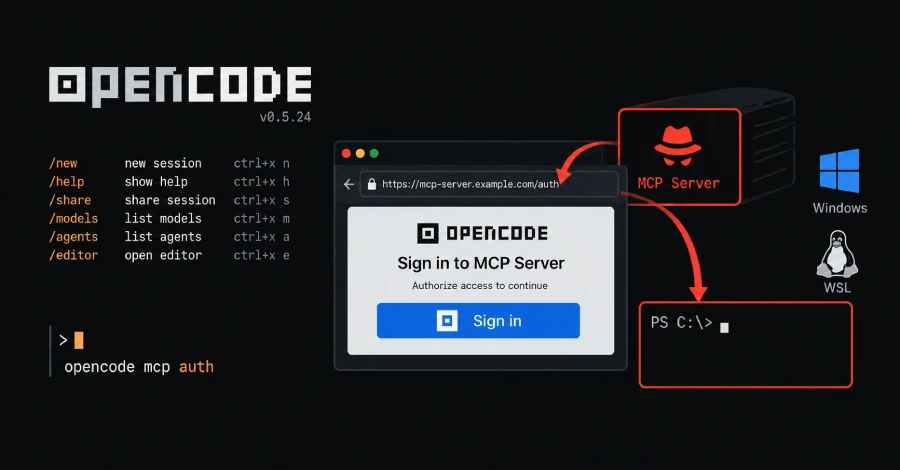
A flaw in the OpenCode AI coding agent allowed a malicious or hijacked MCP server to run code on a developer's Windows or WSL machine when the developer signed in.
Anomaly , the company behind OpenCode, fixed the flaw in version 1.18.33 on September 28.
The flaw is separate from a breach of OpenCode's hosted Console disclosed around the same time, which may have exposed some users' stored API keys for OpenAI, Anthropic, and Google.
Its security policy says MCP servers that a user configures are "outside our trust boundary." Pillar reported the flaw privately on August 29 and later asked Anomaly to reconsider and request a CVE.
The flaw affects OpenCode on Windows and the Windows Subsystem for Linux (WSL).
OpenCode connects to MCP (Model Context Protocol) servers to add outside tools, and such code would run with the developer's own access.
Because there is no CVE, the flaw will not show up in scanners or dependency alerts, so finding affected installs means checking the OpenCode version directly.
It did not request a CVE or publish a security advisory, so vulnerability scanners will not flag the builds still at risk: 1.0.137 through 1.18.32.
During that sign-in, the server itself supplies the web address the user is sent to, an OAuth "authorization endpoint." On Windows and WSL, OpenCode handed that address to a helper that opens it in a browser.
Pillar reported no signs that the flaw has been used in attacks and published no indicators to check for past exploitation.
What happened
A flaw in the OpenCode AI coding agent allowed a malicious or hijacked MCP server to run code on a developer's Windows or WSL machine when the developer signed in.
Anomaly , the company behind OpenCode, fixed the flaw in version 1.18.33 on September 28.
What changed
The flaw is separate from a breach of OpenCode's hosted Console disclosed around the same time, which may have exposed some users' stored API keys for OpenAI, Anthropic, and Google.
Its security policy says MCP servers that a user configures are "outside our trust boundary." Pillar reported the flaw privately on August 29 and later asked Anomaly to reconsider and request a CVE.
Who is affected
The flaw affects OpenCode on Windows and the Windows Subsystem for Linux (WSL).
OpenCode connects to MCP (Model Context Protocol) servers to add outside tools, and such code would run with the developer's own access.
Why it matters
Because there is no CVE, the flaw will not show up in scanners or dependency alerts, so finding affected installs means checking the OpenCode version directly.
It did not request a CVE or publish a security advisory, so vulnerability scanners will not flag the builds still at risk: 1.0.137 through 1.18.32.
Technical details
During that sign-in, the server itself supplies the web address the user is sent to, an OAuth "authorization endpoint." On Windows and WSL, OpenCode handed that address to a helper that opens it in a browser.
Pillar reported no signs that the flaw has been used in attacks and published no indicators to check for past exploitation.
The helper built a PowerShell command around the address without escaping it, so an address written to carry a PowerShell command would run that command.
Response
The pull request that carried it is described as a refactor of browser-launch code, and neither it nor the release notes mention a security flaw.
Anyone running OpenCode on Windows or WSL should upgrade and check which servers they are connected to.
What security teams should do
OpenCode added that check as well, but the hole was closed by updating it to the fixed version.
The usual defense for this class is to check that the address uses HTTP or HTTPS.
Attribution
The Hacker News: A flaw in the OpenCode AI coding agent allowed a malicious or hijacked MCP server to run code on a developer's Windows or WSL machine when the developer signed in.
What to watch next
Watch for new exploitation reports and updated indicators of compromise.
Watch for updated vendor guidance and fixed-version details.